Version 3.0
Jun 09, 2026 → Aug 27, 2026
106 releases
Every metric the app shows is defined in the glossary: Glossary
Your receive address, as a QR code
Sharing a Bittensor address by copy and paste stops working the moment it has to cross from one device to another. Your portfolio now carries a button that opens it as a QR code, to show whoever is sending you TAO. The code encodes the address alone, with no amount and no prefix, because wallets do not all read those the same way and an amount one wallet honours while another ignores it is a trap. The full address stays written under the code, never truncated, and copies in one tap.
- The dialog tells you whose address it isThe portfolio can display any public address, not only yours. When the one on screen is not one of your connected accounts, the title changes and a warning says so, so nobody scans a stranger's address believing it is their own.
A fund's APY, measured over the time it actually ran
A fund's APY was annualised from a single day. That turns one good day into a yearly promise and one bad day into a disaster, when a fund a few weeks old has proven nothing about a year. It is now measured from the fund's inception, over its real age, and the number of days it covers is written next to the figure.
- The figure is coloured againPerformance since inception stayed grey whatever its value, while the line right below it did turn green or red. Both now follow the same code.
- No more "null d" or $0.00 market capsTwo readouts that surfaced when the data was missing instead of staying quiet.
The token picker showed only one root position
Root stake is held validator by validator: an account staked to eight validators owns eight distinct root positions. The token picker listed one of them, always the same one, and the other seven were not merely pushed further down the list, they were unreachable. All of them are listed now, each with its validator. The portfolio had been counting them correctly all along, which made the gap all the more confusing.
- And an order that stops movingTwo positions on the same subnet came out in whatever order the chain returned them, so the list could rearrange itself between refreshes. The largest now comes first, with the hotkey breaking ties.
Three display fixes
Nothing spectacular, three things that got in the way.
- The validators table held less well than it couldHeaders now carry their qualifier as a prefix, which shortens them without making them ambiguous, and the hotkey column was claiming 120 pixels for 62 pixels of content.
- The flows card overflowed on mobileOn a validator's Fund tab it ran outside its track instead of staying in it.
- Unavailable pages centred too highThe "temporarily unavailable" block centred itself inside a fixed box pinned under the header, so it read as top-aligned with empty space below. It now fills the height that is actually visible. Six pages are affected, the testnet faucet among them.
Staking rewards, and a Claim that works again
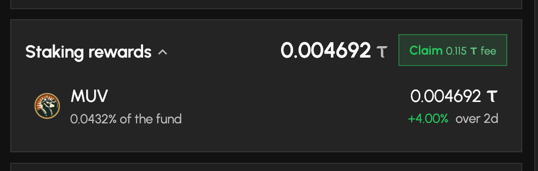
You could already claim your root rewards, the old way. Root Reborn ended that way: the chain stopped filling the counter the app was reading, so the button had quietly vanished for everyone, along with the swap-or-keep setting it offered. Nothing was lost, those rewards sit in your validator's fund. Your portfolio now shows them under Staking rewards, and Claim goes through the Root Reborn call, with its measured fee printed on the button. The breakdown by validator sits behind a fold, closed by default because most holders have only one, and each row opens its validator's page.
A validator's fund, hour by hour
That fund is now readable from the outside. A validator's page has a Fund tab that reads it hour by hour over the last 7 days, and each chart carries its axes, its gridlines and a crosshair that names the value under your pointer.

- What the fund is worthThe total value of everything the fund holds, valued at what a sale would actually fetch rather than at the screen price.
- What a holder earnedNot the same question, and the difference matters. A fund's total grows on deposits as much as on earnings, so the value curve can climb steeply while a holder earned almost nothing. The share price answers what your shares did.
- Money in and money outDeposits and redemptions on one chart and one scale, so the gap between them reads in TAO. Given their own axes, a redemption of 2 TAO against 250 TAO paid in would have filled its own card and looked like an exodus.
- A yield measured over one windowThe share price change and the APY are both measured over exactly 24 hours, and both say so, so the two can be read against each other.
- The curves end where the numbers doThe figures on the cards are read live from the chain while the curves come from hourly snapshots, which is exactly how a card and its chart end up disagreeing. Every curve is carried to the live reading, so they cannot.
The lists took a second to catch up
Opening the subnets or validators list showed a table that was out of date, the prices and every other column with them, and a second or two later the whole table jumped to the current numbers. The lists now load the current table from the start, so nothing changes under your eyes.
How Kusanagi picks the weights it aims its fund at
A validator can point its fund's dividends at chosen subnets. Kusanagi aims at the 64 subnets earning the most emission, each weighted by its market cap, and the full target now opens in one click from Kusanagi's Fund tab: the method, the reasoning, and the whole table with each subnet's UID, market cap, emission and weight. Buying a subnet the chain pays nothing to is paying for something that has stopped producing, so those are out. It is our position, published so it can be compared, and nothing more than that.
Emissions read as a share of the total again
On Compare, the emission curve was drawn in TAO per block, around 0.001, which was unreadable and impossible to line up with the Emission % column of the subnets table. It is now the same percentage as that column. A subnet's Emissions card was affected too, and its Chain Buys card had been reading a hundred times too low since mid July.
Smaller fixes
Three small ones.
- The top bar lost its backgroundOpening any dialog made the header go transparent over the page behind it.
- NAV, defined where it is usedA fund's value is a NAV, its net asset value, and the word turns up wherever funds do. The glossary defines it, and the card carries that definition in its tooltip rather than assuming you know it.
- A subnet logo could send a request per rowIdentity images with a relative address were resolved against the current page, so a table full of them fired one dead request per line.
What delegating to a validator returns
You could see how big a validator was, never what delegating to it returned. Those numbers are on the page now, measured on what the chain paid out over the last 7 days.
- Yield on the validators listA sortable APY column, so you can rank validators by what they return instead of by their size.
- What it pays out each dayOn a validator's page: the TAO shared with its delegators per day, and the share it keeps as commission.
- Subnet by subnetA validator does not return the same everywhere. Its page now breaks the yield down for each subnet it validates.
- A Validators tab on every subnetThe same question the other way round: on this subnet, who validates it and what has each one returned. Ranked by yield, so "who do I delegate to here" is answered on the page you are already on.
Light mode is fixed, across the whole app
In light mode a lot of cards, borders, separators and hover states were painted white on white, so they were simply not there. They are back, everywhere. The six accent themes had a related problem: their green and red were tuned for dark mode, which left a P&L column close to unreadable in light. Dark mode has not changed.
A first visit is about a third lighter
The app sends about a third less data the first time you open it, so pages appear sooner. The difference is biggest on a slow connection or on a phone.
The app speaks your language further in
A few places were still English whatever language you picked, or left to your browser to guess.
- Column pickersThe list you open to show and hide columns was in English, even though the table header right above it was translated.
- Relative datesThe Date column of every activity table, and the blocks table, said "5m ago" and "3d ago" in English.
- Dates and timesThey follow your chosen language now instead of your browser's guess, so the same block reads the same way for everyone.
- Signing messagesCancelling a signature, a locked wallet or a missing signer all reported in English. They are translated now.
- FrenchFrench wording was made consistent throughout.
Tables keep what you set, and what they were showing
A few improvements to the data tables.
- Hidden columns are remembered everywhereA few tables remembered the order of your columns but not the ones you had hidden, so your choice came back on reload. Your existing settings still work, there is nothing to redo.
- A failed refresh no longer wipes the pageThe subnets and validators tables refresh themselves just after they appear, and if that refresh failed, the rows already on your screen were replaced by an error message. They stay now, with a note that they may be out of date and a button to retry.
- Favorites on top, only when you wantThe subnets table floats your favorites above everything, which is handy until you sort by a metric and their rank starts jumping around. A new button by the Favorites filter turns that off, so favorites sit at their real rank while you compare, then back on when you want them leading. It remembers your choice.
Usable with a keyboard, and named for screen readers
The trade cart only looked closed: its buttons, Execute included, could still be reached with Tab from behind the panel. The expandable row on your portfolio holdings was mouse-only, two tables could not be sorted from the keyboard, and several checkboxes had no name a screen reader could read out.
The paths where a mistake costs TAO
Four fixes worth naming.
- Smart Actions prices what it submitsIt set its price limit from the market price before your trade instead of the price you would actually get, so your slippage tolerance had to cover your own trade's impact and the chain rejected the larger parts of a batch. Every other trade screen already did this correctly.
- The large-trade confirmation no longer disappearsWhen the TAO price was briefly unavailable, the confirmation step went quiet and a large swap could go straight through. It now uses the last known price, and still asks when the value cannot be worked out.
- The network you are signing is namedThe confirmation dialog identified the chain with a long line of raw characters that nobody checks by eye. It now names the network, and warns you explicitly if it does not recognise it.
- Creating a wallet no longer freezes the tabGoing back a step while creating a wallet emptied the seed words, and continuing from there could lock the tab up.
A cleaner, fully controllable delegations table
The Delegations tab on any validator now has proper pagination, search, group-by-account, and column controls, matching the subnet holders table. The subnet column is split into a dedicated UID column and the subnet logo + name, and stake amounts show in full instead of K/M shorthand.
No more jumping back to the top
Changing page, sorting, filtering, or switching tabs on the explore and portfolio tables now keeps your scroll position instead of yanking you back to the top of the page.
The glossary is live: every metric, defined
New page, available at glossary and from the footer: every single metric the app displays, with its exact formula, the caveats that make it read differently from other explorers, and the exact API request that returns it. Each definition has its own link, and llms.txt publishes the whole reference in an agent-readable format, so tools and LLMs can fetch precise definitions and the calls behind them.
Closed positions keep their APY and PnL
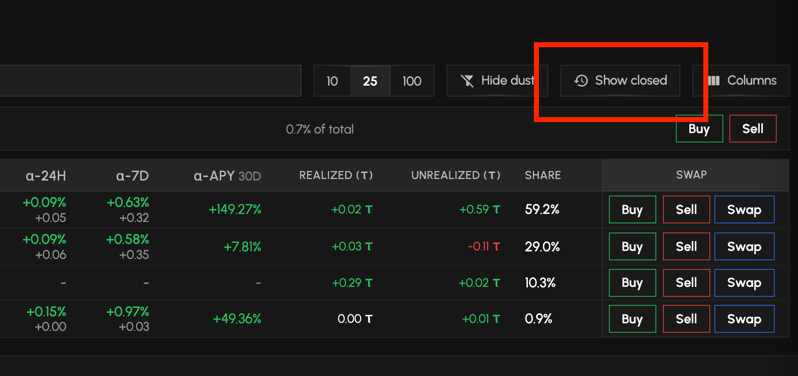
Selling out of a subnet used to erase it from your portfolio balances, and its APY and PnL went with it. The new "Show closed" button, next to Hide dust, brings those positions back as zero-balance rows, with their all-time APY and their PnL. One caveat worth knowing: leaving a subnet through a swap carries your cost basis over to the destination subnet, so realized PnL can legitimately read 0 on such a row.
No more failed trades on non-tradable subnets
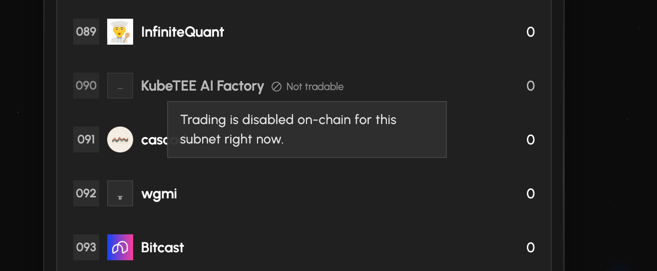
Some subnets have their alpha token disabled on-chain and can't be traded. The app now blocks those trades up front, everywhere, so you never hit a failed transaction: the home swap, the Buy/Sell panel on a subnet, and the portfolio batch. In the token picker they stay listed but greyed out with a "Not tradable" badge.
Filter the subnet side panel by tag
On Compare and Multi-chart, the subnet side panel now filters by tag, so you can pull up just your "Tier 1" or "My low caps" subnets when building a comparison. It appears once you've created subnet tags, and stacks with the search and the All / Favorites views.
A calmer, unified loading spinner
Loading indicators across the whole app now share one sober, monochrome spinner, replacing the old blue accent one, so waits look cleaner and more consistent, from tables and dialogs to the TradingView charts.
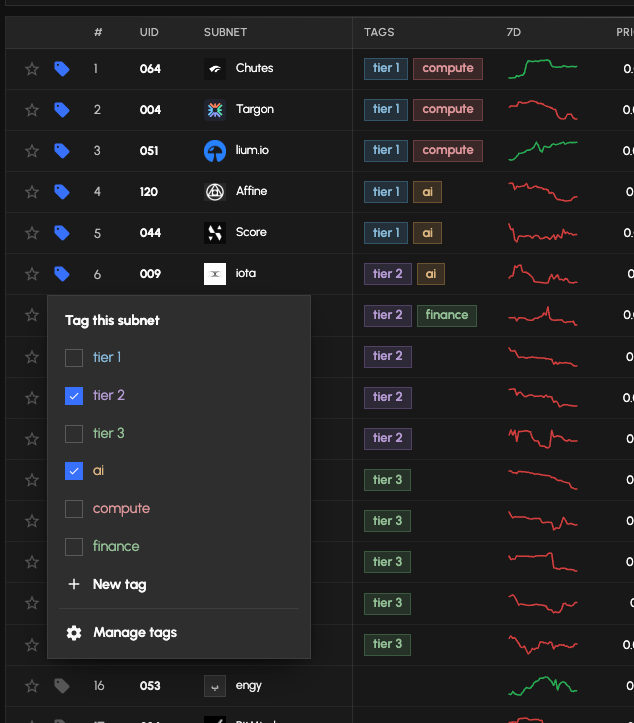
Organize subnets and validators with your own tags
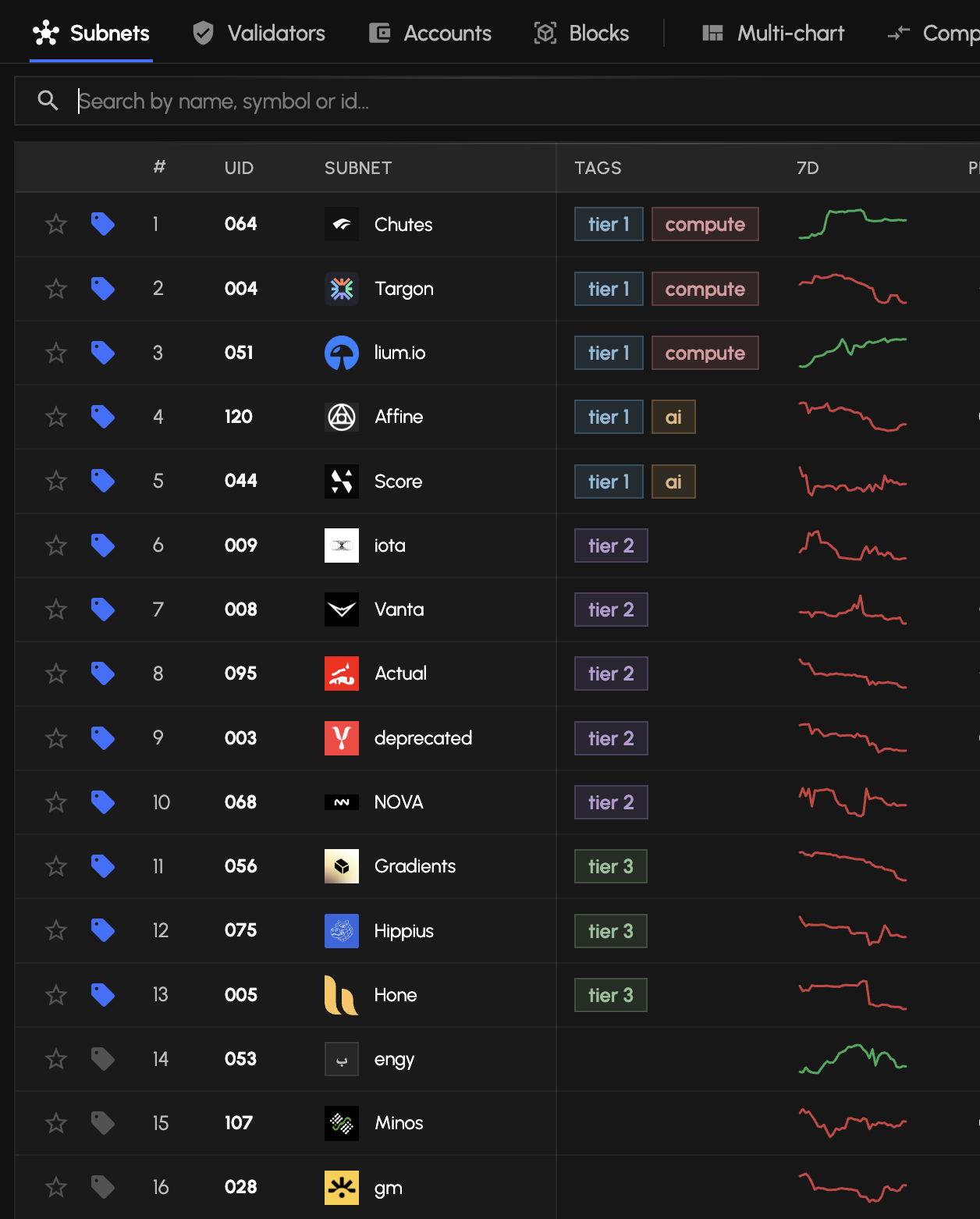
Create custom, color-coded tags (like "Tier 1" or "My low caps") and pin them to any subnet or validator. Subnet and validator tags stay separate sets, so the same label can mean different things in each list. Everything is stored privately in your browser.
- Assign anywhereTag straight from the Subnets and Validators tables, next to the favorite star, or from any detail page.
- Filter and sortNarrow a table to the tags you care about, and sort the Tags column to cluster your labeled rows.
- Manage in one placeCreate, rename, recolor or delete tags from the Manage tags dialog.
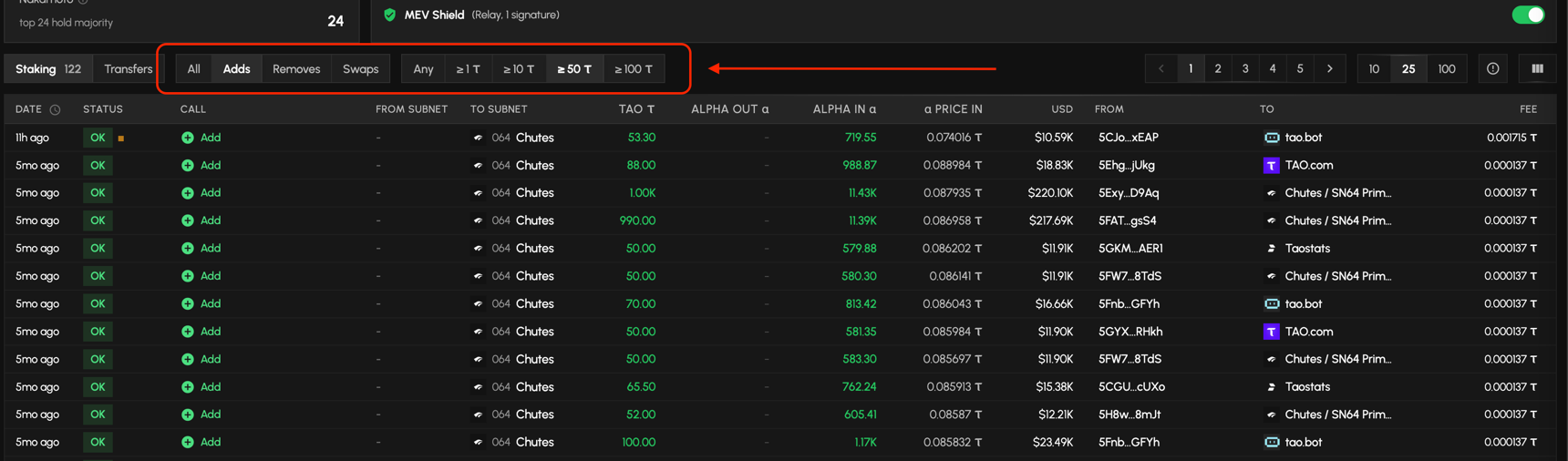
Filter a subnet's transactions by action and amount
On a subnet's transactions table, filter by action type and set a minimum value to cut through the noise. The Staking and Transfers badges reflect the same filters.
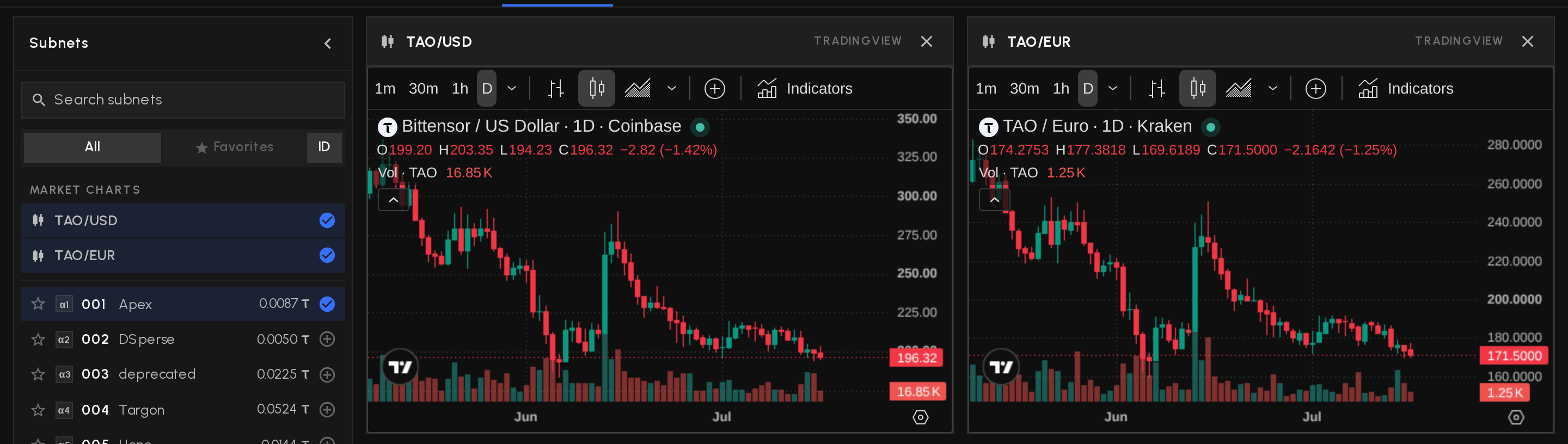
Show or hide the TAO/USD and TAO/EUR market charts
On Multi-chart, the two TradingView market charts now sit in the side panel under Market charts: toggle them like any subnet, or hide one straight from the ✕ on its card. Your choice is remembered on your device.
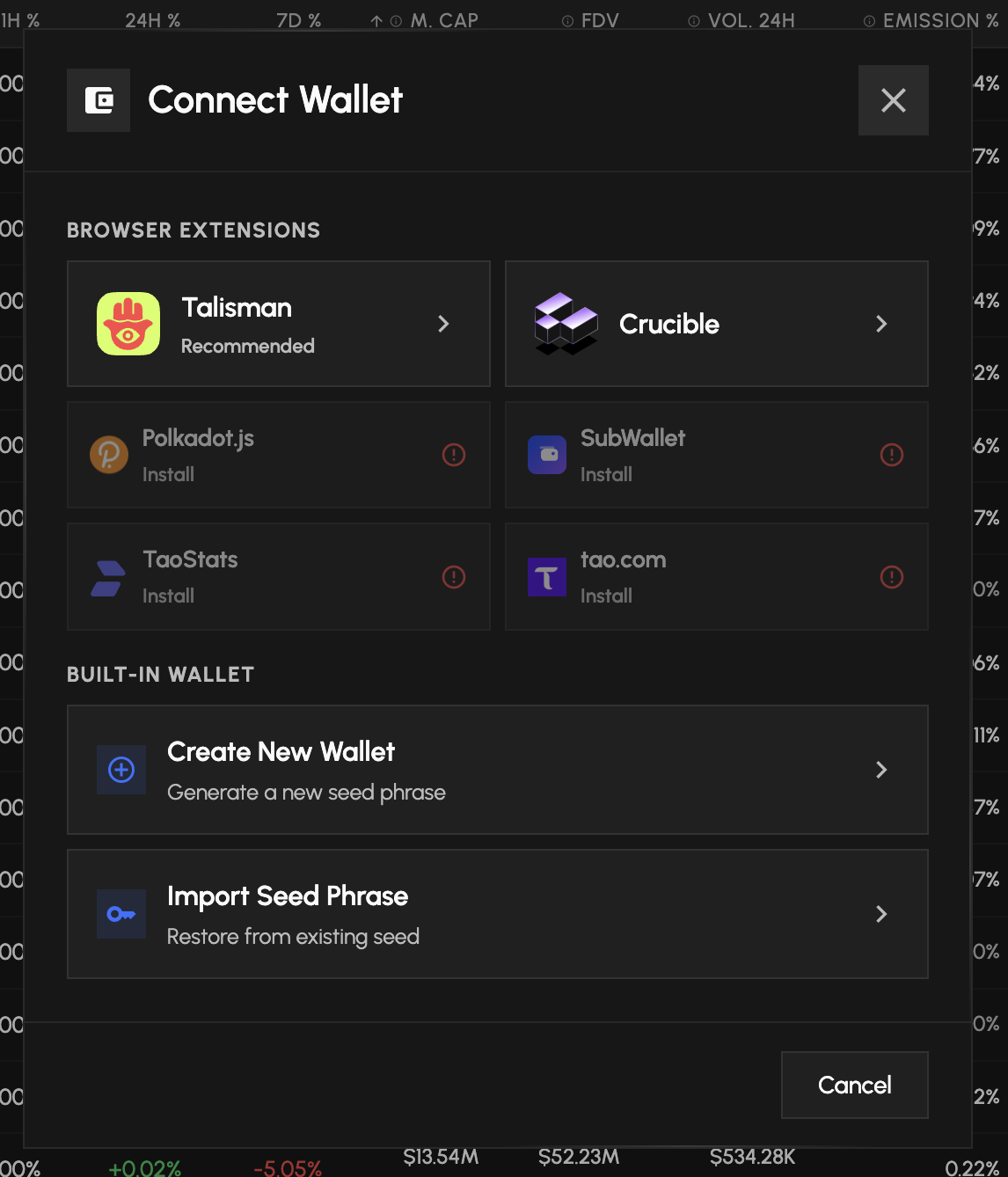
Connect with Crucible Wallet
Crucible, the Bittensor-native wallet with Ledger support, is now a supported browser extension. Open Connect Wallet, pick Crucible, and stake or swap with your Crucible accounts.
Name and save your chart layouts
Subnet charts now use named layouts. Set up your indicators and drawings, then Save As to keep them under a name that shows in the header and loads back when you return. Once named, a layout keeps itself up to date as you tweak it, and a Save marker in the header flags any unsaved changes.
Simpler timeframe picker
The interval controls are now a single button that opens the full timeframe list, instead of several buttons spread across the top of the chart.
Sign a message with your wallet
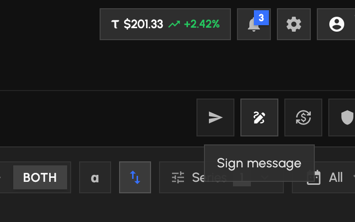
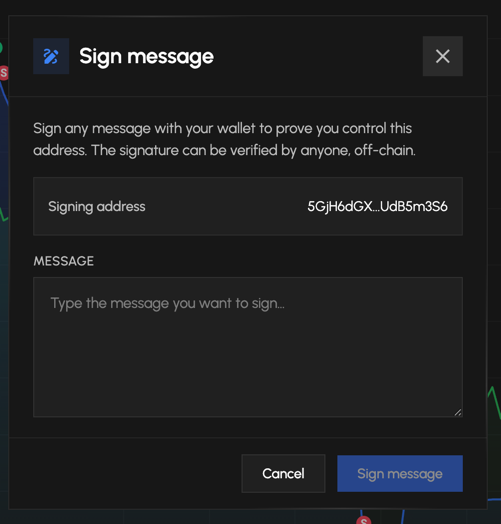
In pro mode, a new Sign button appears in the portfolio action bar, next to Send. Type any message and sign it with your connected wallet (extension or in-app) to prove you control the address, then copy the signature to share or verify off-chain.
Save your subnet chart layouts, TradingView-style
Every subnet now keeps its own chart layout automatically. Your indicators, timeframe and drawings come back exactly as you left them, under a name that sticks, with no more "Save as" prompt on every change.
Mobile display fixes
On phones, the transaction and "What's New" notifications no longer sit behind the bottom navigation bar, and the date range picker now fits the screen instead of overflowing off the side.
Snappier validator delegators table
Paging, sorting, searching and grouping a validator's delegators is now near-instant and downloads a fraction of the data, since each interaction only fetches the rows it needs instead of the whole page.
Seed import now matches btcli and Talisman
Importing a seed phrase now restores the same standard address every other wallet shows (btcli, Talisman, polkadot.js). Existing built-in wallets get their standard address added automatically at the next unlock, and when it holds your funds it becomes the selected account. Your previous address stays fully accessible.
Choose your accounts at import
When restoring a seed phrase, Taoswap now lists the standard address plus the first derived accounts with their live balances. Funded accounts are pre-selected, and you pick exactly which ones to import.
Derived accounts, made obvious
Accounts living under a derivation path wear a //N badge in the account menu, and the seed export screen reminds you that these accounts need their path on top of the seed phrase in other wallets. A few texts (glossary formulas, some addresses) also stop rendering in the wrong font.
tao.com in Connect Wallet
The Bittensor Wallet entry becomes tao.com, the rebranded official Bittensor extension, with its new logo and Chrome Web Store install link. Existing connections keep working unchanged.
Deregistration risk table
A new table under the Subnets grid shows which subnets the next registration would deregister, ordered by price EMA (the lowest is next to go). Page through it, hide immune subnets, and read each one's risk rank, flags and registration date at a glance.
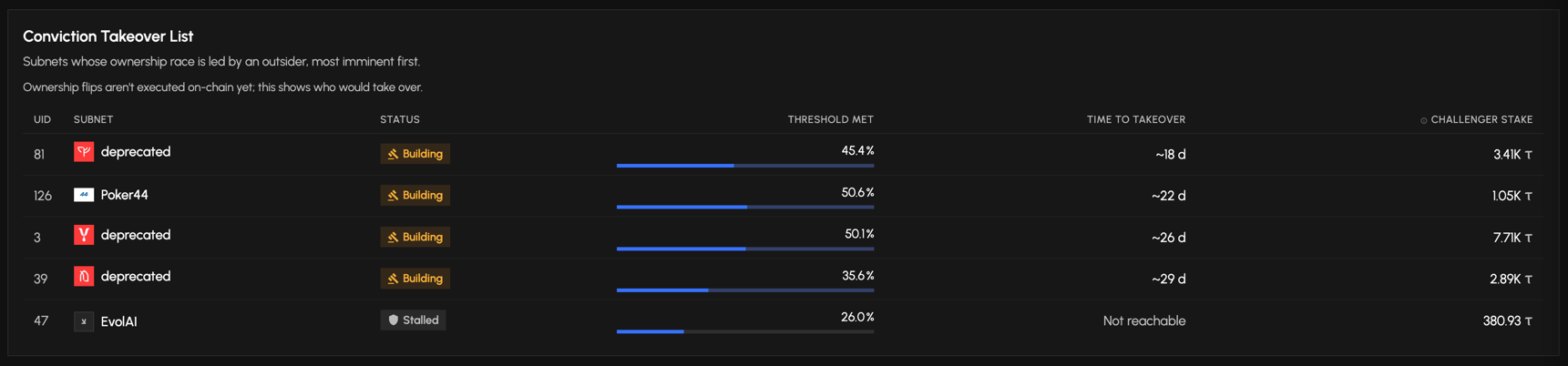
Conviction Takeover List, expanded
The takeover list now paginates and gains Registered and Age gate columns. You can hide subnets that aren't eligible yet (still under the 1-year age gate), and a tooltip explains how the time to takeover is projected.
Table polish
Both tables adopt the standard look with softer headers and roomier rows, your hide-immune and hide-ineligible filters are remembered between visits, and the Subnet Registration Cost chart no longer captures your scroll.
Sticky header fix
On the Subnets page, the table's floating header now scrolls away with its own table instead of lingering over the Conviction Takeover List below it.
Cleaner release notes
Small point releases now show every change on a single page instead of paging through them one by one, and the update prompt is down to one quiet call to action.
Polish
In the Takeover list, the subnet logo and name sit centered in their cell, matching the main subnets table.
Conviction Takeover List
A new table under the subnets grid lists the subnets whose ownership race is led by an outsider, so the owner is at risk of being dethroned, ranked most imminent first. Each row shows the status, how much of the 10% conviction gate is filled, the time to takeover and the challenger's stake, and links to that subnet's Conviction tab.
24h volume in the subnets table
A sortable 24h Volume column: each subnet's rolling 24-hour AMM volume, in TAO and USD.
Tighter table headers
Shorter titles and unit symbols aligned to the right across the Explore tables, so columns fit their data.
Conviction columns lead by default
Conviction, Takeover and Locked now sit right after Emission % in the subnets table.
Polish
Column-header tooltips stay put while scrolling, and the glossary market cap now nets burned alpha.
Ownership takeover, tracked live
Subnet ownership is a race: conviction locked behind a hotkey matures toward the 10% gate that lets the highest-conviction key take the subnet. Taoswap now tracks every piece of it.

- The takeover panelThe Conviction tab shows total conviction, the 10% threshold and a buffered gauge: the solid fill is matured conviction, the pale segment is locked α still maturing toward its ceiling, and the verdict line says when the gate fills, or that it never will with the current locks.
- Owner convicted vs takeover imminentWhen both gates pass, the badge tells you who wins: green when the highest-conviction key is the owner itself (self-secured), red when an outsider would take the subnet at the next epoch. Enforcement ships with runtime spec 425; the note says so until then.
- Two new table columnsThe subnets table gains Takeover (how much of the gate is filled, green once passed) and τ Locked (conviction-locked α valued at its realizable τ), both sortable.
- At a glance on the summaryThe subnet summary card carries a compact Takeover gate line, with the same time-to-gate verdict in its tooltip.
Subnet pages, tidied
- Registered dateThe fundamentals card now shows when the subnet was registered, derived live from its first block.
- Task-first mobile layoutOn a phone the subnet page reorders into summary, trade, tabs, then content, so the action is never below the fold.
- A leaner conviction cardDuplicate KPIs are gone and the owner-emission line moved into the takeover panel, next to the context it feeds.
Release notes become Latest updates
This page, and everything that leads to it, got a professional pass.
A calmer launch
The boot screen was rebuilt: a monochrome staggered logo replaces the spinner, it only appears when there is truly nothing to paint yet, and a failed first load releases it instead of hanging.
Compare, rebuilt for every screen
The subnet compare tool got a full ergonomics pass, on phones and desktops alike. Try it
- Pick subnets on mobile againThe subnet picker now opens from a Subnets button at the top of the page. The old floating button had ended up hidden behind the bottom tab bar.
- Metrics as a dropdown on phonesThe metric pills fold into a compact dropdown on small screens, and the legend chips step aside, so the chart gets almost the whole viewport.
- Foldable metric picker on desktopA new toggle collapses the metric pills into the same dropdown and pulls everything onto one thin line: metric, subnet chips and the date range, which now lives at the right end of the row. Your choice is remembered.
- A leaner legendEach chip is now the subnet logo ringed in its series colour plus the id, no more separate dot and SN prefix. The side panel mirrors the same look.
Burned alpha: the real number
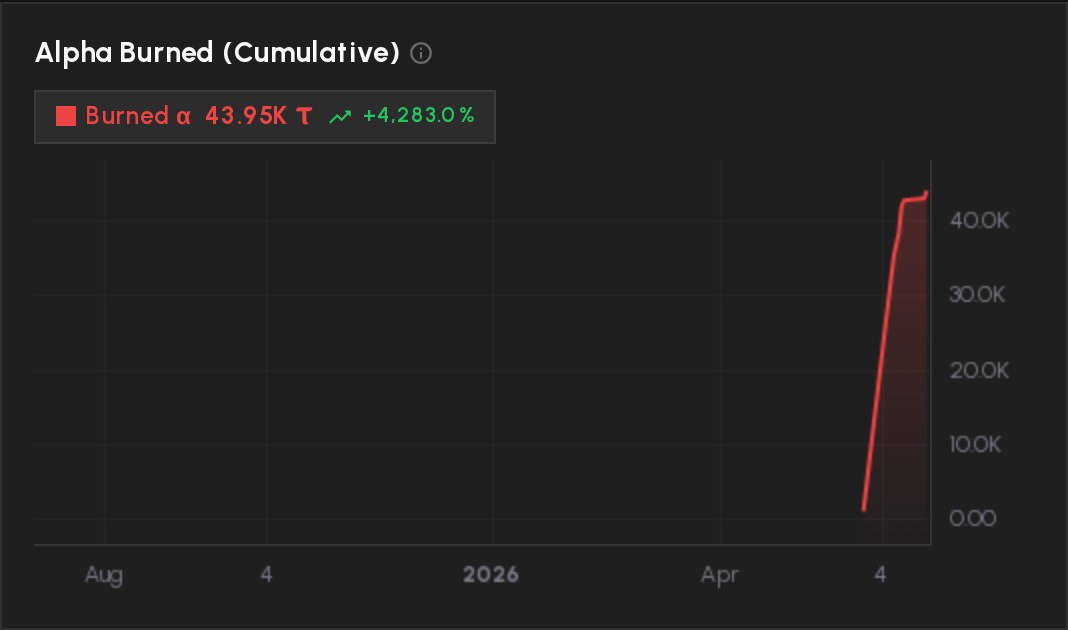
Burn figures now come from the on-chain burn counter, which sees every burn path, not just explicit burn extrinsics. On some subnets the honest figure is dozens of times higher.
- Best-known totals everywhereThe BURNED column, the subnet Supply & Burn panel and their TAO values combine the on-chain counter with historical voluntary burns, so no subnet loses its history.
- Charts that tell the truthThe cumulative burn chart plots the on-chain counter directly, and the compare tool reads all-paths daily burns. Days before the counter existed (May 28, 2026) show as gaps, never as fake zeros.
- Glossary kept in syncThe ADR formula now nets burned alpha out of the staked supply, and the Burned entry documents exactly which sources feed the number.
What's new becomes a page
Release notes move out of the popup into a documentation-style page, one URL per version. Browse the releases
- Still one tap awayThe new-version toast keeps opening the quick highlights dialog, and the full page sits in the footer.
Subnet charts: volume readable again
The volume pane on the pro chart is back on a linear scale. Log reads well for price, not for bars: everyday volume looked flat next to the spikes. Saved chart layouts pick the fix up automatically.
Conviction: lock α behind a hotkey
Conviction goes hands-on: lock or move tokens to back a hotkey of your choice, straight from the app.
- Lock to back a hotkeyLock alpha behind the hotkey you believe in to add conviction weight to it.
- Locked α cannot be sold by accidentLocked positions are kept out of swaps, batch sells and subnet-trade sells.
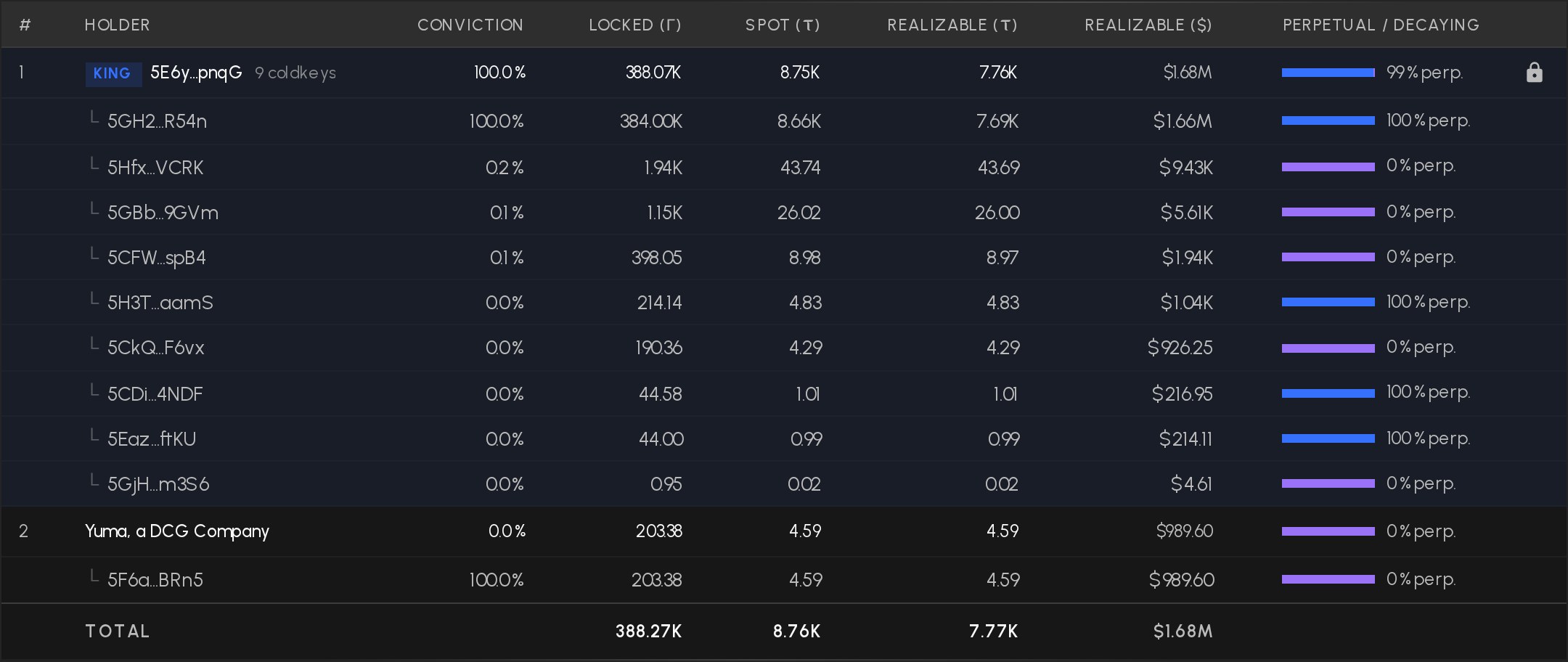
- Spot vs realizable valueConviction value is split into spot and realizable τ (with totals), realizable USD gets its own column, and the leaderboard Value column now shows both τ and USD.
Explore: sharper subnet pages
- Root Prop % columnThe subnets table and the subnet detail now surface each subnet's root proportion share.
- Tabs with real URLsSubnet-detail tabs are now path segments, so a shared link to Holders or History lands on that exact tab.
Mobile lands on the action
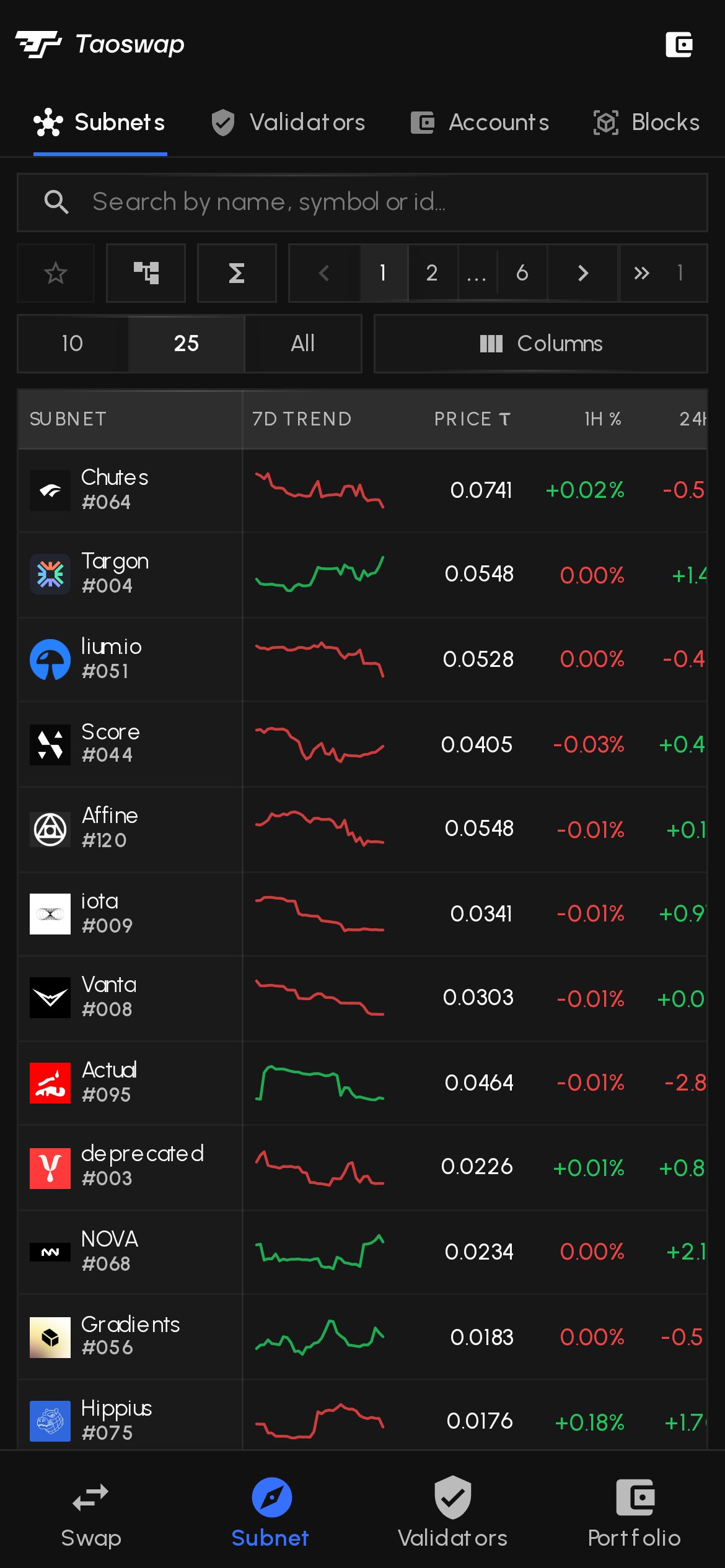
Phone visitors skip the desktop home and get tables built for small screens.
- Straight to the subnetsOn a phone, the home route now lands on Explore > Subnets without flashing the home page first, and your ?ref and deeplinks survive the redirect.
- KPI-first tablesExplore and portfolio tables lead with the key figures at phone width, backed by a nav overhaul.
- Balance chart within reachThe portfolio balance-chart controls wrap and pack left on mobile, so nothing sits off-screen.
Portfolio lookup: live preview
The lookup page swapped its static feature tiles for a live portfolio preview, so you see the real thing before you even connect.
Testnet faucet: less friction, clearer rules
- Cloudflare TurnstileTurnstile replaces reCAPTCHA, so most claims verify without solving a puzzle.
- Clear expectationsNew disclaimers spell out that testnet TAO has no market value and that claims are rate-limited against abuse. The claim limit is now 10 TAO.
Subnet charts: drawings that persist
- TA drawings stickTrend lines and shapes you draw on a subnet chart now survive reloads.
- Default layout cascadeSubnets you never opened inherit your default layout and template as expected.
PWA: icons that actually refresh
- Versioned icon URLsApp icons are versioned, so an icon refresh reaches your home screen instead of hitting a stale cache.
- iOS reinstall nudgeiOS never re-fetches an installed icon, so installed iOS users get a one-time prompt to reinstall after an icon refresh.
Polish and fixes
- MAX that mirrors executionSwap MAX validation now computes exactly what execution will, ending the false insufficient-balance rejections.
- MEV Shield double-checksA swap is rechecked before being reported as failed, so fewer false alarms.
- MECHS explainedThe MECHS column gained an info tooltip explaining subnet mechanisms.
Mobile: a nav built for thumbs
First big mobile pass: the app now gets around like a native app on your phone.
- Native bottom barSwap, Subnet and Portfolio sit in a bottom navigation bar, one tap away wherever you are.
- Everything fits a phoneThe table pages and the app shell were reworked at iPhone width, so nothing clips or overflows anymore.
- Explore and Tools everywhereThe subnav is now mounted on every page, home included, and gained a Smart Actions tab.
Transactions: color means direction
One rule across every transaction table: green and red tell you which way value moved, nothing else.
- Colored by what the call doesAmounts are tinted by the actual movement of the call (incoming or outgoing), not by which column they sit in.
- Quieter numbersThe USD column dropped its permanent green, and the TAO column lost the redundant +/- sign (the color already says it).
Emission status on the subnets table
Some subnets have their emissions disabled by on-chain governance. The table now says so instead of showing a silent 0.
- Emission-off dotA small dot sits left of the emission value, flagging the governance switch while keeping the % column aligned.
Chain buys: exact, straight from the chain
The Chain Buys column now reads the exact on-chain excess TAO emission instead of a price-based τ/day estimate.
- On-chain, not estimatedValues come from the chain's own excess-TAO counter, so shares can shift sharply versus before: that is the data getting truthful.
- Columns that add upPer-block emission = directly injected TAO + chain buys, so Emission % and Chain Buys finally reconcile.
Metagraph: parent validators
Child hotkeys stop being a black box on the metagraph.
- Parents per neuronEach neuron now lists its parent validators with their stake weight.
Polish and fixes
- Pinned favorites keep their real rankA pinned subnet shows its true # position in the table, not its pinned row index.
- Batch swaps stay validator-to-validatorBatch legs no longer hop to a different validator mid-swap, and subnet-detail units were harmonized on the way.
- Swap-then-move signs itselfWhen a swap ends with a move step, that step now signs automatically instead of waiting for a second confirmation.
- Signing can no longer hangMove, swap and tax-report signing are guarded with a timeout when the wallet cannot sign.
- Dust stays actionableAggregated dust holdings in the portfolio keep their trade actions, and new trades seed from your largest position on the subnet.
Subnet charts: draw once, apply everywhere
Your subnet chart setup now follows you from one subnet to the next, and you can push it to every subnet in a single click.
- "Apply to all" buttonSits next to Reset in the chart header. It broadcasts the current chart's indicators, interval and properties to every subnet, and sets a template so subnets you have never opened inherit it too. Changed your mind? The snackbar has an Undo.
- Per-subnet auto-saveEach subnet now remembers its own layout silently (no more single shared chart). A subnet you have never opened starts on the neutral default.
- Tool defaults that stickRectangle color, line thickness and font size carry across charts instead of resetting every time.
- Volume stays how you left itRemove the Volume pane and it will not come back on the next load.
- Calmer save UXWe hid TradingView's redundant blue Save prompt (the auto-save already covers it), and the saved-layouts list no longer piles up duplicates.
Trade: sell from any position, buy from root
The buy and sell panels were reworked so the controls line up and reflect what you actually hold.
- Sell from the right positionThe sell side lists your held positions on the subnet (one row per hotkey, largest first) instead of a generic validator dropdown, so you pick exactly which stake to unwind.
- Buy with free TAO or from rootA "Pay with" toggle in the buy header funds a buy from free TAO or by moving stake from your root position. It only shows when you hold root, and falls back to free TAO if root runs out.
- Aligned buy/sell panelsBoth panels share a row height so the amount inputs line up, and the slippage row is anchored to the bottom so it no longer jumps. On root buys the validator locks to the root origin, with a tooltip explaining why.
- Accurate MAXMAX and percentage amounts floor to native precision instead of rounding up past your real balance, fixing the false "insufficient stake" error.
Validator detail: parents and child keys
The monitoring table is clearer when a hotkey is part of a parent/child relationship.
- Parent validators on expandRows whose hotkey is a child now expand into a clean table of each parent (identity, proportion, childkey take, ACTIVE/PENDING).
- One row per childActive and pending entries for the same subnet plus child are merged into a single row showing the transition (for example 0.3% to 1.4%), instead of listing the child twice.
- Click anywhere to expandThe whole row toggles open. The full hotkey stays on the tooltip (and stays findable with Ctrl+F), and subnet links still navigate.
Subnets table: the full picture by default
The table now shows everything out of the box, so you trim columns down instead of hunting for them.
- All columns visibleEvery metric is on by default. Hide what you do not need from the column selector. Off by default: owner, Price ($), 30D % and 90D %.
- Reordered by themeColumns flow through identity, price, valuation, emission, activity, decentralization, then supply, liquidity and depth.
- Shorter "Nak." headerThe wide "Nakamoto" header is abbreviated. The full name stays in the tooltip and the column menu.
Conviction leaderboard
The subnet conviction panel is easier to read and rank.
- Sort by any columnRank, holder, conviction, locked, value and split are all sortable. The # column keeps the conviction rank even when you sort on another metric, and locker sub-rows ride with their holder.
- Locked value in α and τTotal locked now shows the locked alpha amount and its TAO spot value, instead of a single dollar figure.
Portfolio balance chart
Trade markers and scaling got a pass so the balance chart reads the same way as the subnet charts.
- Round buy/sell marksThe tilted pin bubbles are gone. Buys and sells now show as round B/S marks anchored to the line, both sitting just above it (the color and the B/S letter tell them apart).
- LIN / LOG toggleA linear/log scale switch sits in the bottom-right corner of the pane (like the compare chart), and your choice is remembered.
- Markers toggle that persistsTurning trade markers on or off now sticks across reloads, independent of pro mode. Before, the choice was silently reset on every pro-mode change.
Testnet faucet redesign
The testnet faucet now matches the app's sober look.
- Quieter, clearer claimThe balance is a quiet live stat and the claim is the single primary action.
- Sortable historyThe claim history is now sortable by address, date, amount and status.
Polish and persistence
- More of your choices stickThe transactions page-size restores on reload, and the trade cart moved to local storage so a half-built batch survives a browser restart.
- Tidier tablesSortable headers are vertically centered, and the α/τ unit suffix is flush-right in the ALPHA and TAO columns.
- Mono-first cleanupA consistent warning color and theme-aware chrome across pages, so things adapt properly in light mode.
- Always the fresh buildThe service worker now busts its cache on every release, so you stop getting served a stale shell after an update.
A mono-first redesign
Taoswap moved to an achromatic, restrained look where color carries meaning instead of decoration.
New wordmark, font and hero
The brand was refreshed end to end.
Explore, rebuilt
The subnet and validator pages were reworked, with new metrics and a steadier layout.
- Subnet detail upgradesA dedicated chart tab with in-place content, FDV, a 7-day trend sparkline in the subnets table, and drag-to-reorder columns on the holders table.
- Validator detail matches subnet detailThe validator page now uses the same layout as subnet detail, with refined summary, delegations and chart legends.
- New KPIs and a section navAlpha Distribution Ratio (ADR) and Alpha Burned, each with a history chart, plus a persistent secondary nav bar for Explore.
Conviction, enriched
The conviction view gained depth and a slimmer card.
- Per-coldkey locker breakdownA slimmer sidebar card that breaks lockers down per coldkey.
- Richer fieldsRealizable value, supply percentage and king split are now surfaced from the backend.
Trade batch, redesigned
The batch (cart) drawer was rebuilt for multi-trade flows.
- Wider, clearer drawerA two-column wide drawer with collapsible sections, subnet logos, a top slippage chip and USD min-received per row.
- Full-drain MAX and MEV ShieldMAX sells drain the full position dust-free, and a MEV Shield toggle (relay) is available on the buy and sell panels.
Compare subnets: more KPIs, sticky settings
The compare view got more metrics and remembers your setup.
- Daily / cumulative togglesFlow KPIs switch between daily and cumulative, and an Alpha Burned KPI was added.
- Remembers your viewThe last-selected KPI and the linear/log scale mode persist across visits.